
Universal file support
Images, audio, video, and regular files in one pass.Eight tools in one desktop app
Find duplicates. Rename batches. Search everything. Undo anything.
Dupe Zappa scans for duplicate files, cleans leftover junk, batch-renames files, and indexes document contents locally. Every destructive action is previewed first, with an undo history if you change your mind.
- Duplicate & junk scanner
- Batch rename + AI Tidy
- Universal content search
- Undo, history & safety
Windows today. Built for large local folders and shared drives.
Cleanup Console
Ready for the ugly folders
Overview
ModesScanner / AI Tidy / Settings
Selection24 files across 6 duplicate groups
SafetyPreview, undo, history, Recycle Bin
Active scan
Mixed media folder6 groups foundcache hit 78%ETA 00:21
AI tidy preview
IMG_4932.PNGvienna-session-001.pngready
IMG_4932 (1).PNGvienna-session-002.pnggrouped
audio_final_master.wavskip on conflictreview
Recent operations
Batch rename applied12 files - 14:26
AppliedDuplicate delete undone3 files - 14:18
RevertedAI tidy plan generatedrename suggestions - 14:03
PreviewedPreview before apply
Diffs and conflict handling stay visible before anything changes.Undo and operation history
Cleanup work stays reversible when a batch goes sideways.Large-library scanning
Caching and progress feedback help when local folders or shared drives get heavy.Pricing
One-time purchase. No subscription.
Early Access pricing applies while Dupe Zappa matures. Prices will increase later, but existing customers keep the licence they purchased. A direct purchase is a perpetual one-device licence and includes every future Dupe Zappa update that is released.
Direct purchase: Windows installer plus a perpetual licence for one active device. Move it by deactivating the old device first. All future Dupe Zappa updates that are released are included.
Direct checkout is sold and billed by Lemon Squeezy, our Merchant of Record. Taxes and the final total are calculated at checkout. Microsoft Store purchases are licensed and managed separately by Microsoft and do not include a MerginIT licence key.
How It Works
Scan, review, apply, and rewind when you need to.
Inspect before you batch. Keep undo and history close for the folders that actually matter.
01
Scan
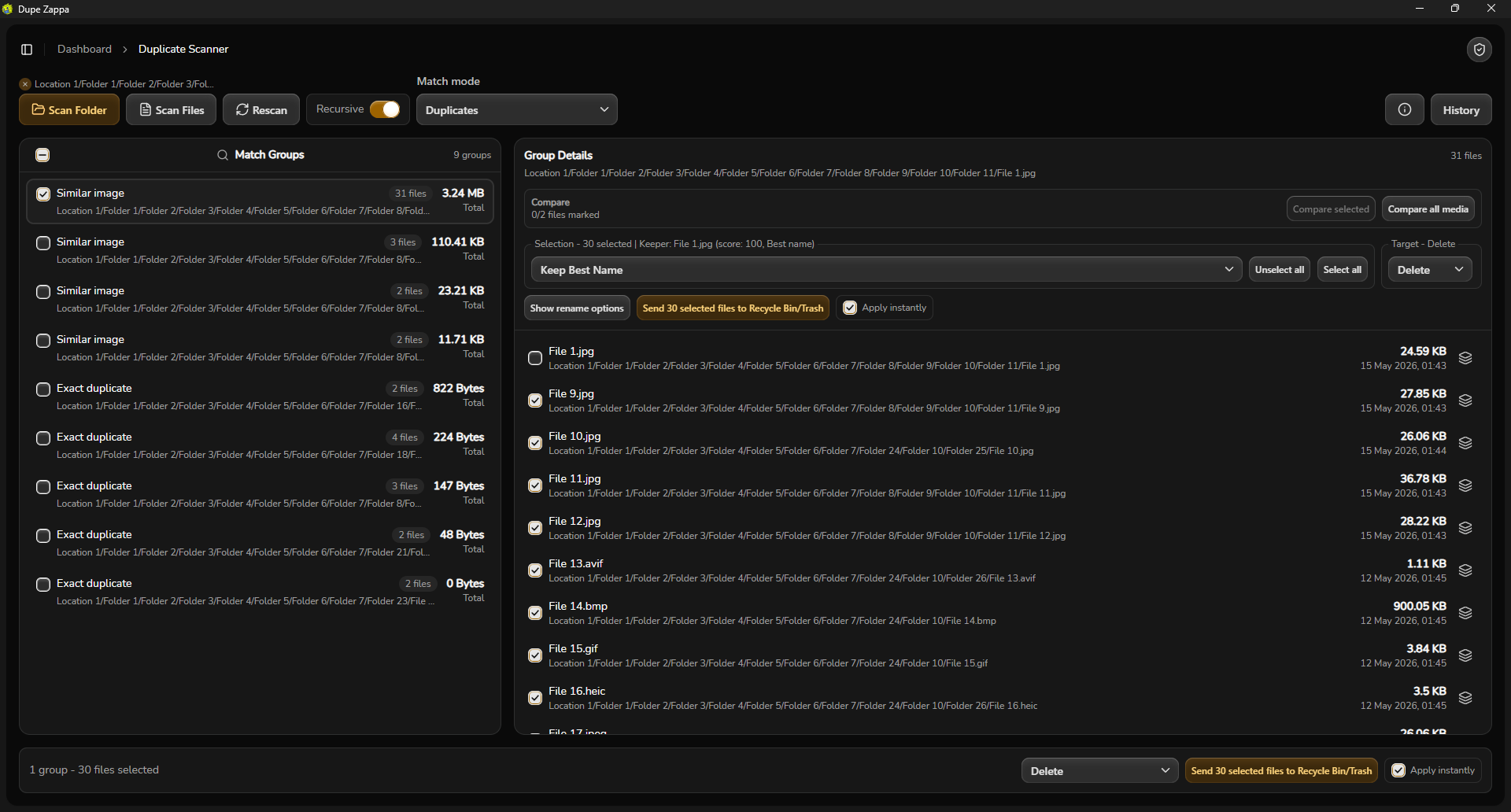
Pick a folder, include recursion when needed, and let Dupe Zappa build duplicate groups without freezing your workflow.
Progress states, pause/resume, and caching keep long runs readable.
02
Review
Inspect duplicate groups, file details, and metadata before you decide what stays, what moves, and what gets trashed.
Inspect original file paths and metadata side by side before confirming any change.
03
Tidy
Use batch rename tools or AI Tidy suggestions to clean names, organize archive sets, and resolve conflicts with preview-first rules.
AI suggestions stay opt-in, with plan summaries and review before apply.
04
Apply
Commit the changes you actually want, send mistakes to the Recycle Bin, and fall back to undo or redo when you need to rewind.
Operation history logs what changed so you are not guessing later.
Features
A cleanup tool that acts like cleanup is risky, because it is.
Dupe Zappa focuses on the parts that matter when the folder count is real and the files actually matter.
Core Workflow
Detection
Duplicate groups across mixed libraries
Scan regular files and near-duplicate images in one pass instead of juggling separate tools.
AI Tidy
Rename suggestions with human approval
Generate clean-name or archive-set suggestions from filenames and readable content samples, then apply only after checking the diff.
Batch Rename
Fast batch rename tools
Build consistent prefixes, suffixes, numbering, and token-based renames with a clear preview loop.
File Insight
Metadata and detail views stay close
Open file details and check paths and timestamps without leaving the cleanup flow.
Conflict Rules
Skip, overwrite, or increment
Handle collisions explicitly so batch operations do not surprise you halfway through an apply step.
History
Undo, redo, and operation logs
Every meaningful cleanup action can be inspected later, which matters when you are cleaning a drive instead of editing a demo dataset.
Power Tools
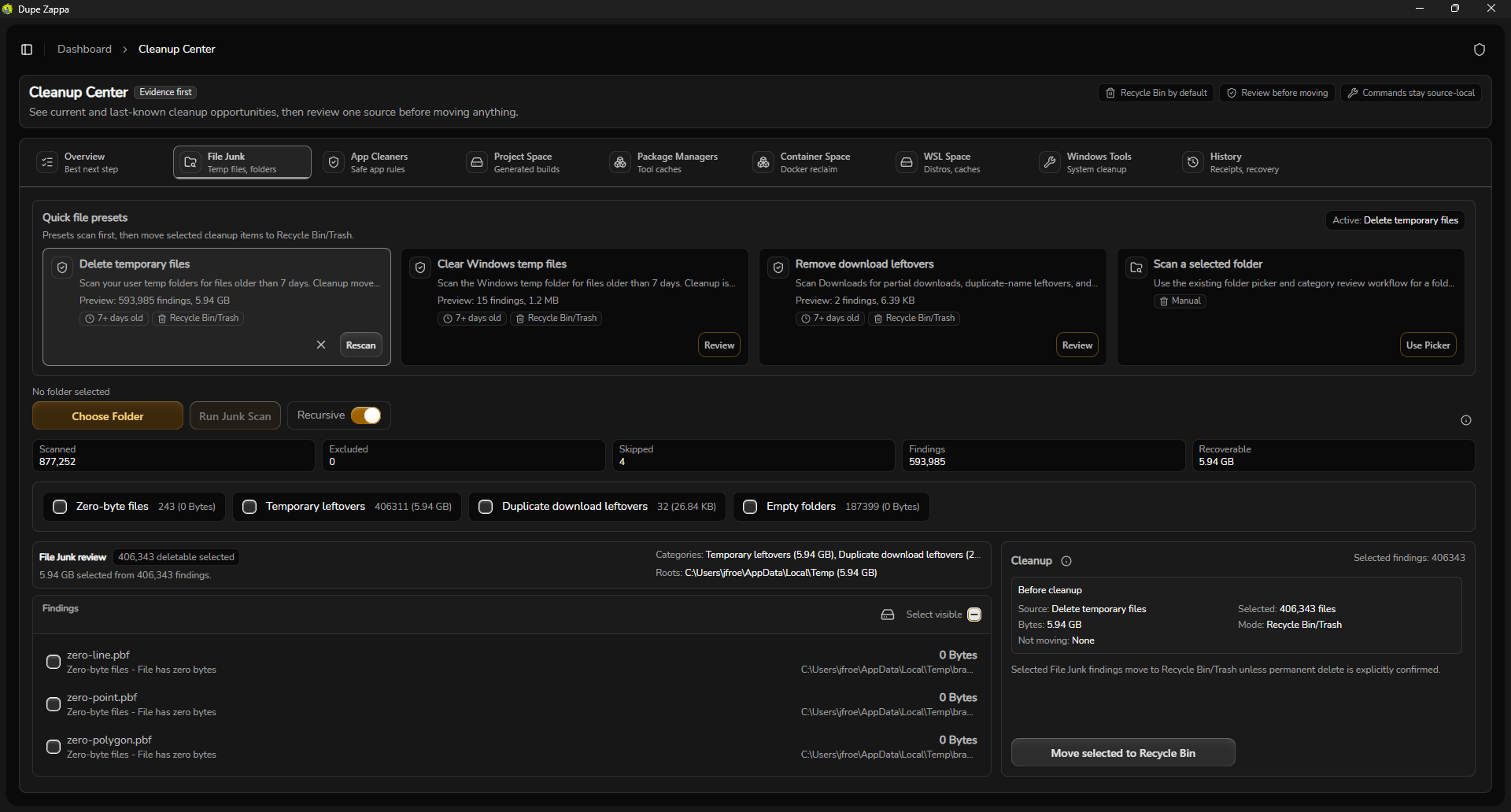
Cleanup Center
Clean project caches, WSL, Docker, and junk
Scan empty files, dead shortcuts, developer caches (npm, Go, pip, NuGet), WSL distros, and Docker images in one pass.
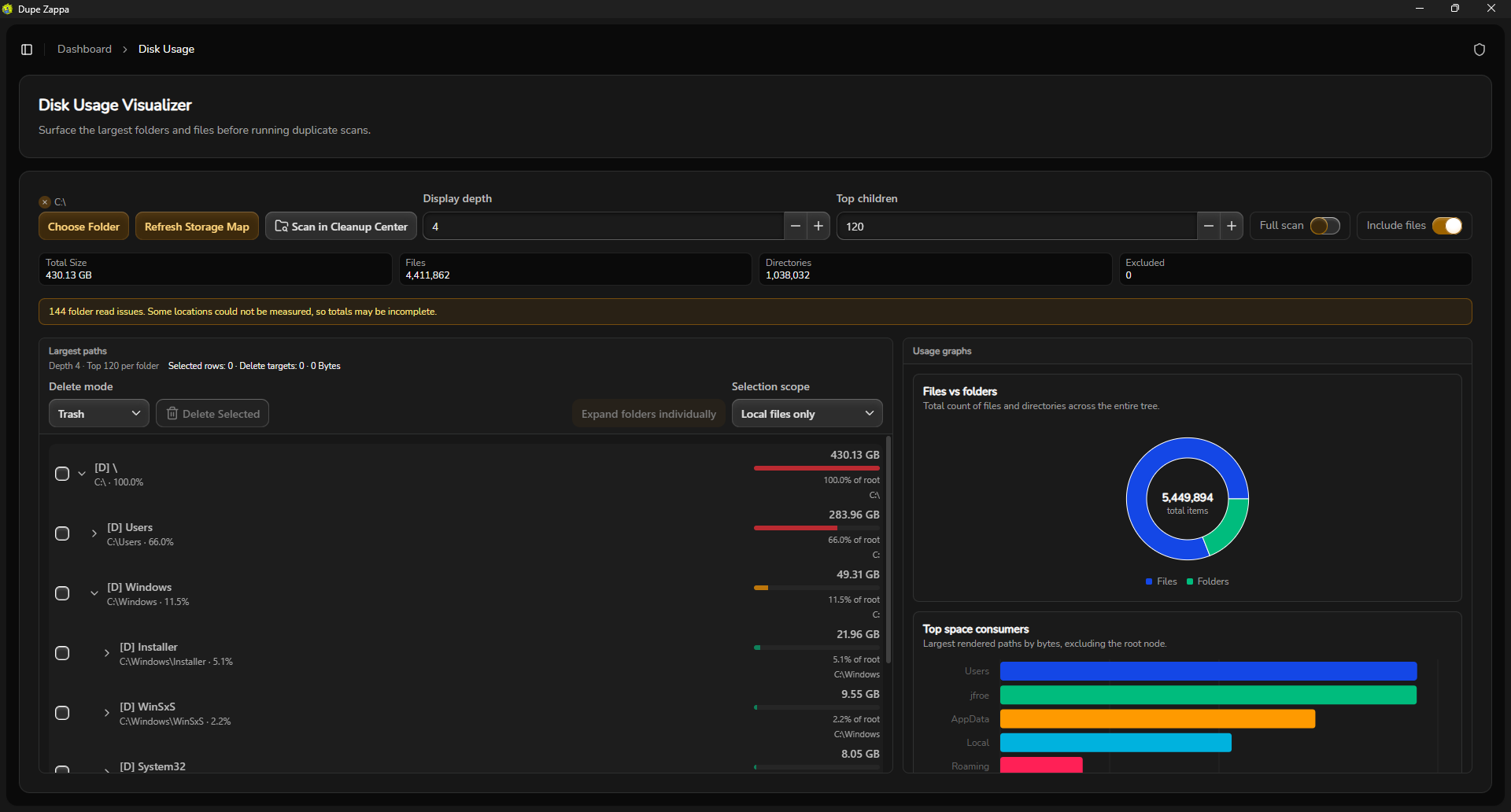
Disk Usage
Visualize storage before you delete
Size-ranked tree maps and file-type breakdowns help you spot space hogs before running any cleanup.
Universal Search
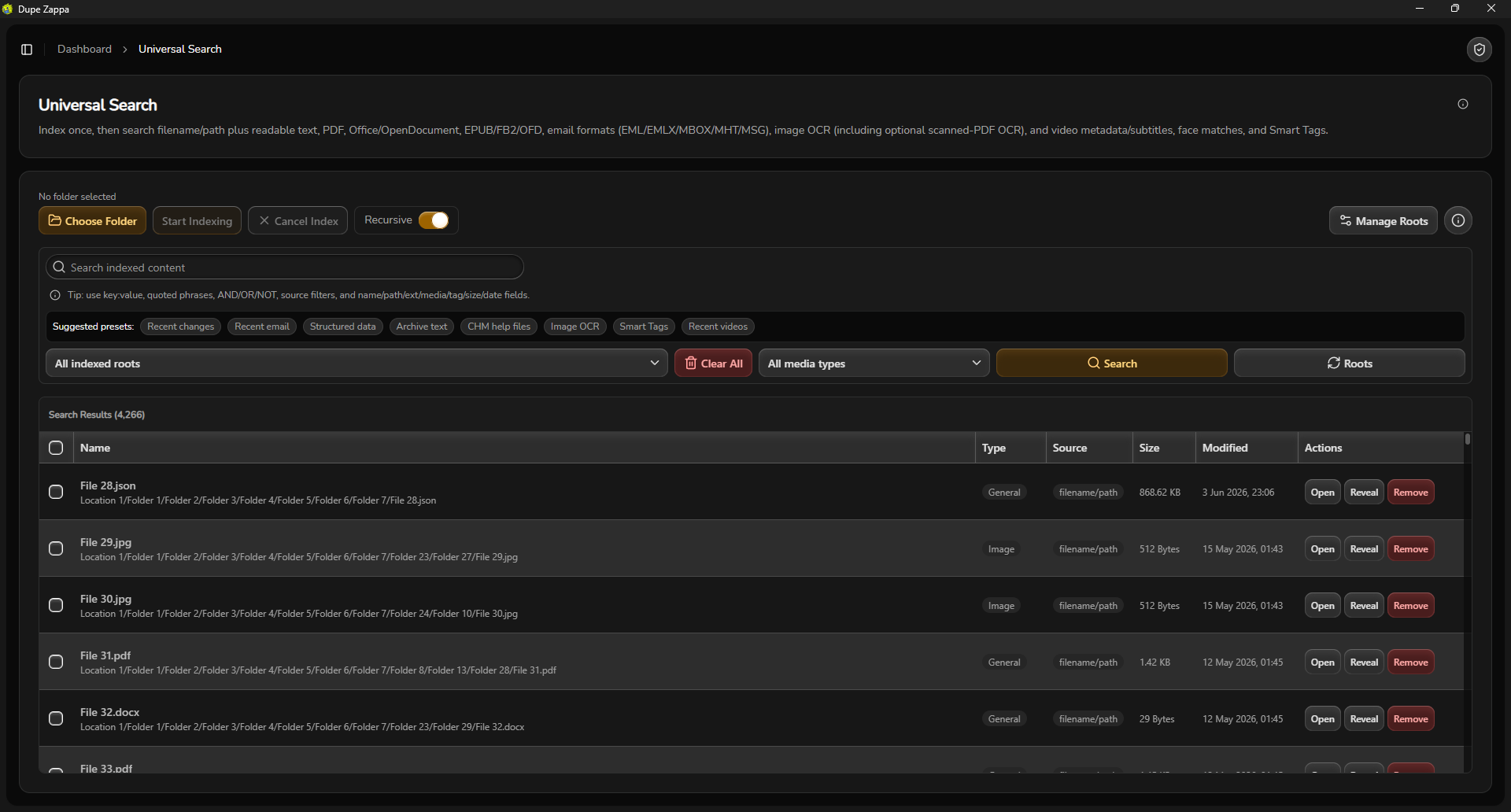
Find files by content, not just name
Index filenames, documents, emails, archives, subtitles, metadata, and optional OCR text so nothing hides.
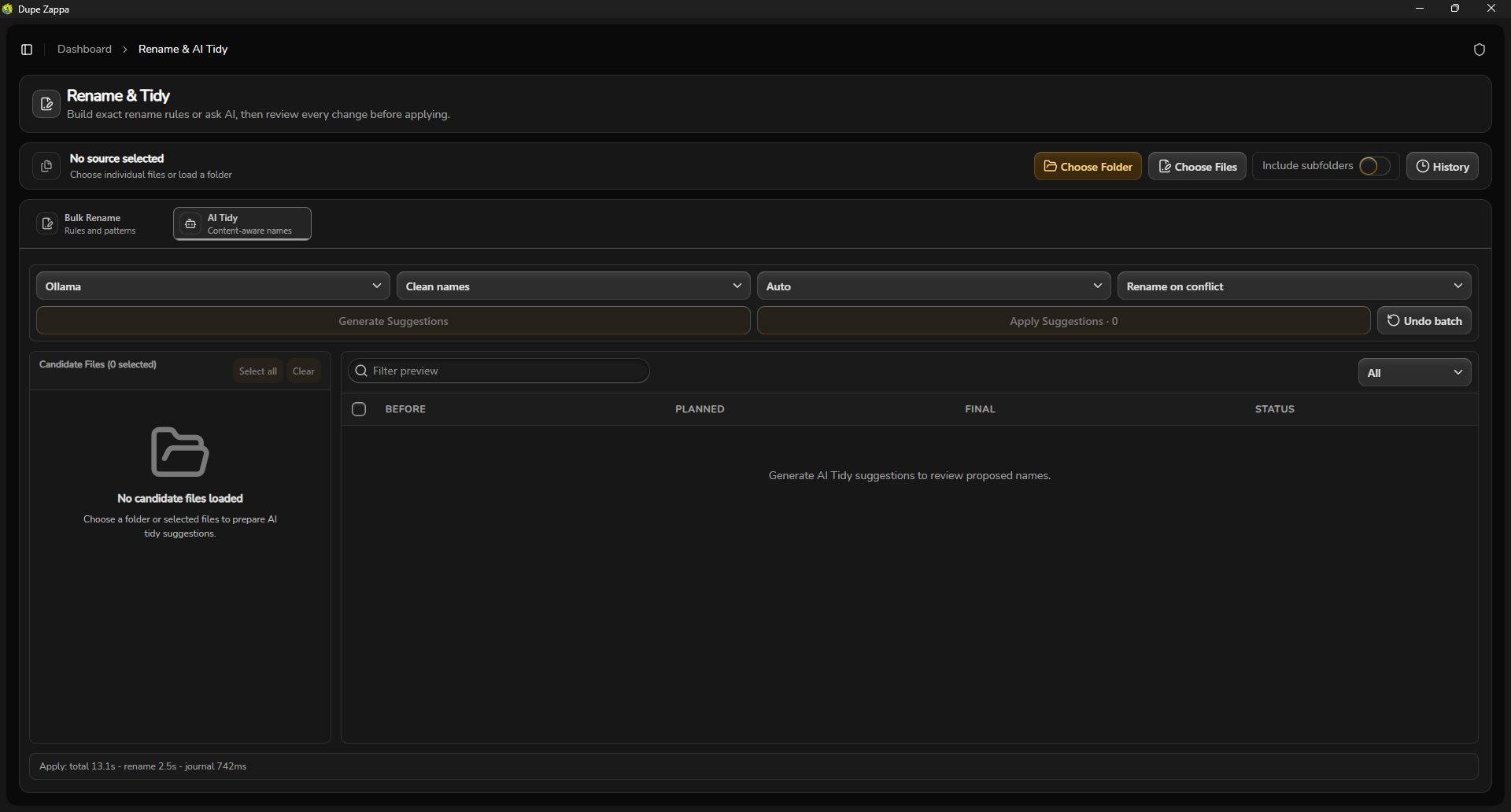
Batch Rename & AI Tidy
Batch rename with regex and local AI
Combine pattern-based batch renaming with optional AI organization proposals powered by local Ollama.
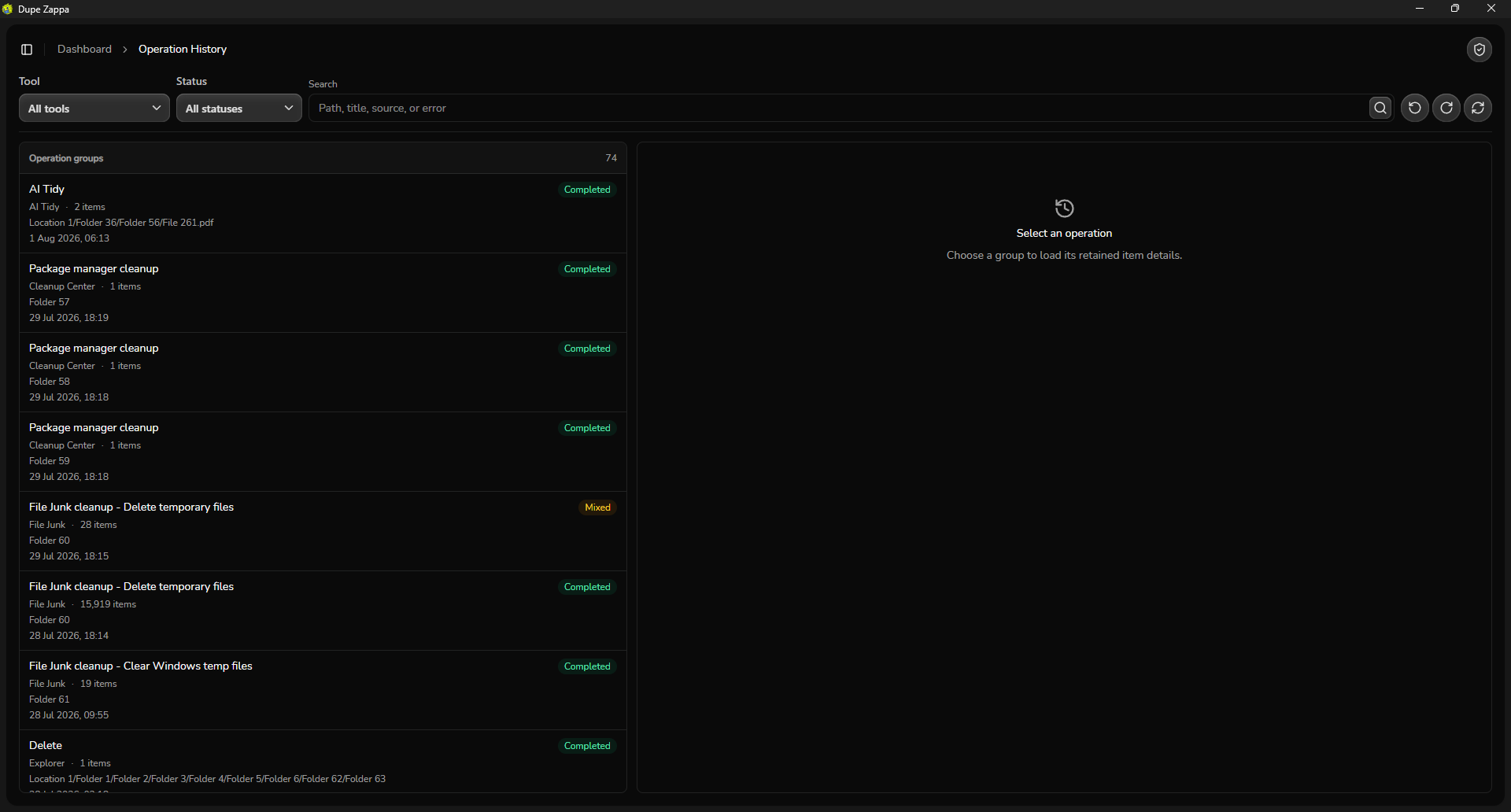
Operation History
Searchable action journal and group undo
Review every past move, rename, or deletion in a searchable log, with group undo and redo options.
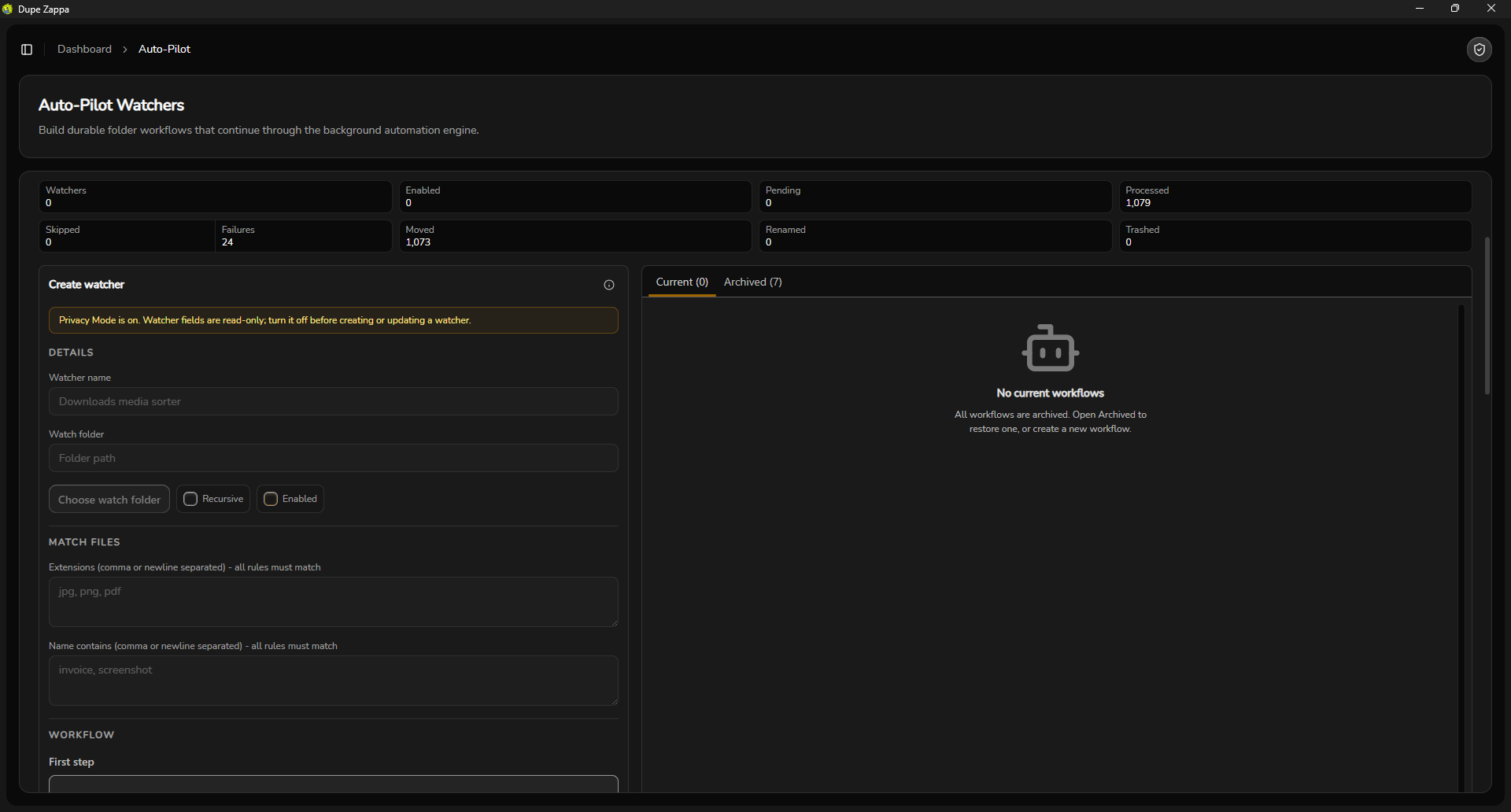
Auto-Pilot
Rule-based background cleanup
Set extension and name-match rules to move or trash files automatically using a background service.
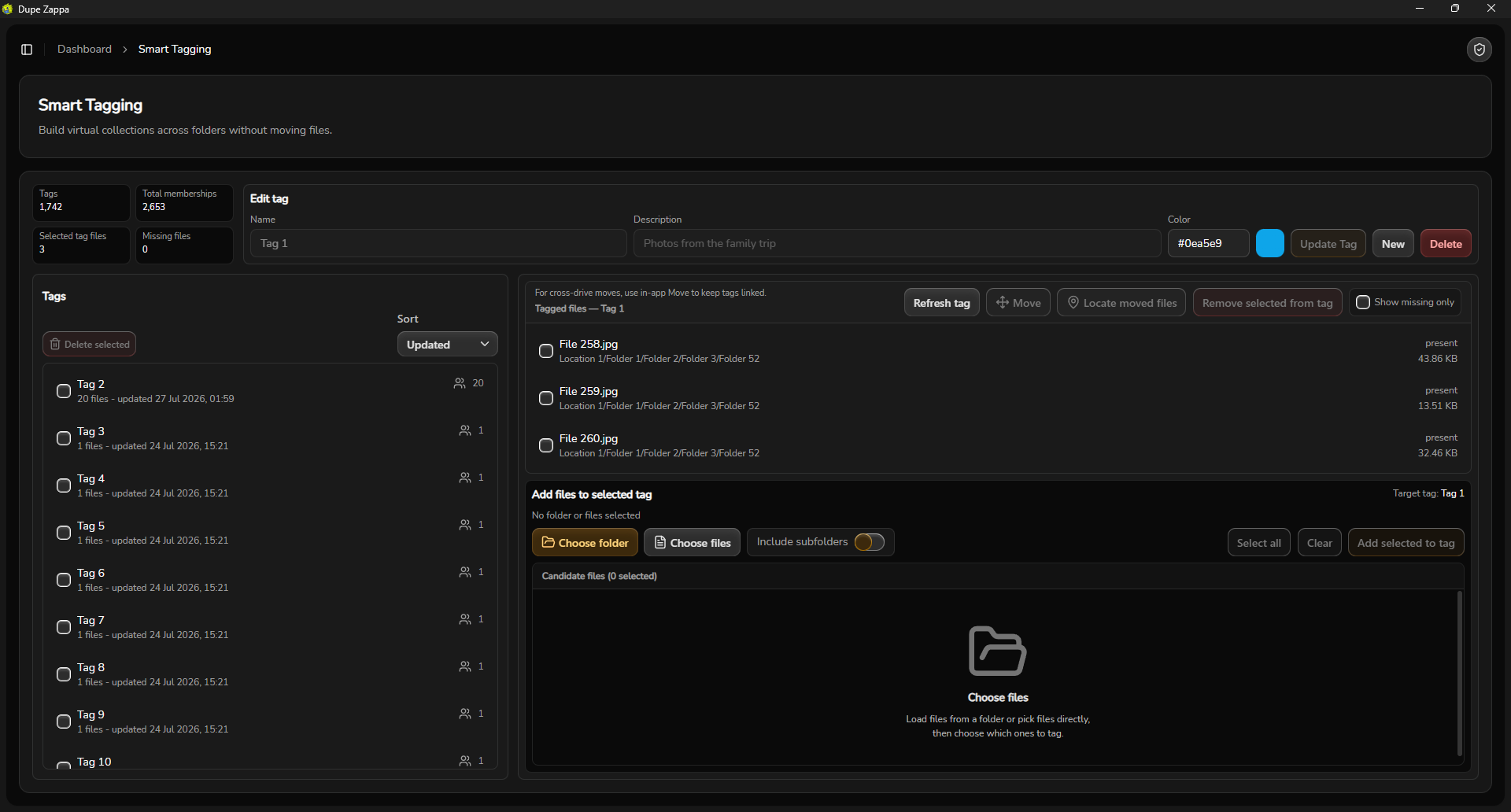
Smart Tags
Virtual collections without moving files
Tag files from any folder into color-coded groups. Search them later without touching disk layout.
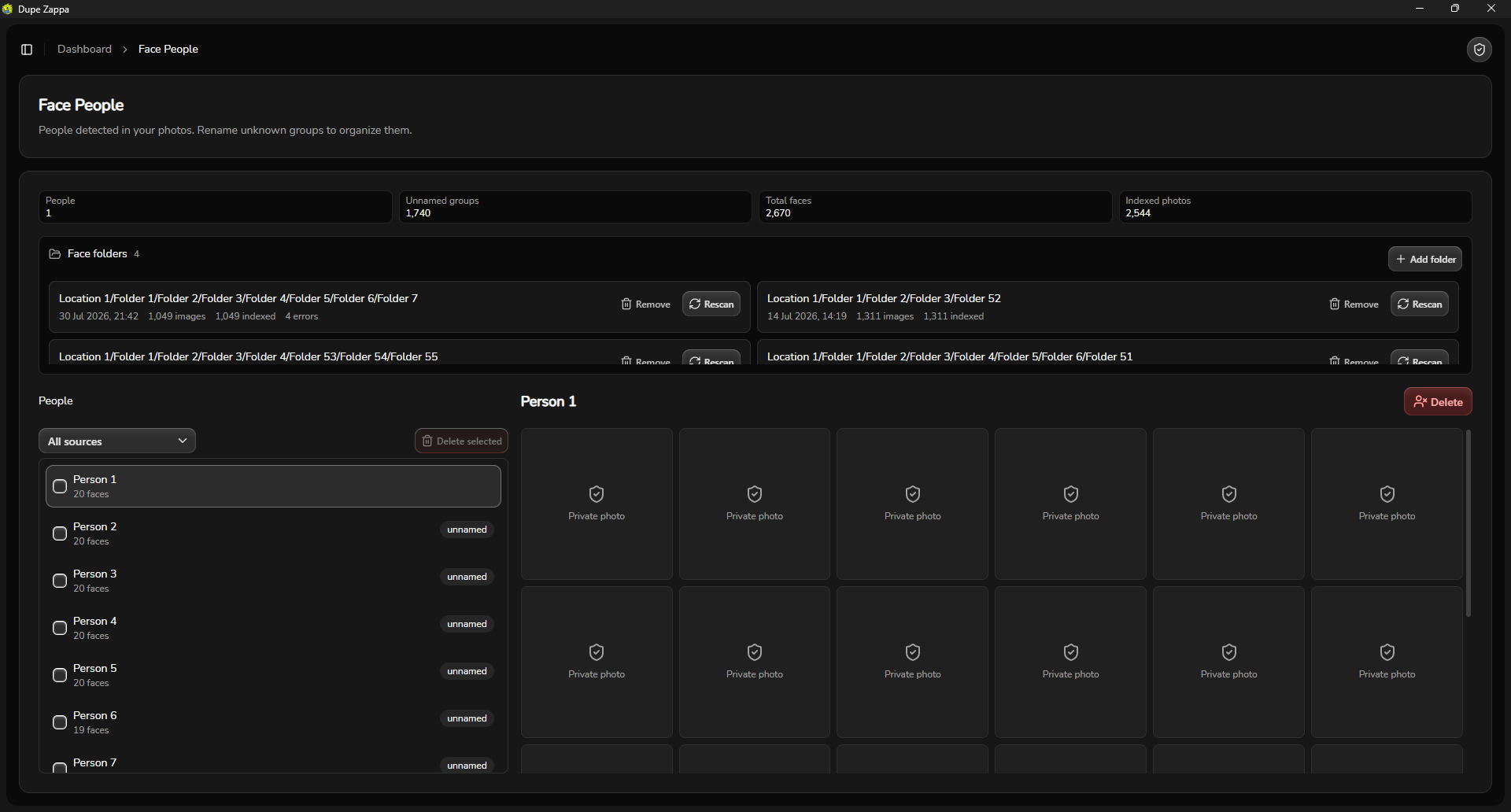
Face Recognition
Group photos by person locally
Detect and cluster faces with a local ONNX model. Name people and sync them to Smart Tags.
Why Dupe Zappa?
One toolkit instead of stacking single-purpose utilities.
No subscriptions
One-time price vs. annual cleaner plans
CCleaner Pro is an annual subscription for system cache and browser cleanup (from $44.95/year (list price); see ccleaner.com). Dupe Zappa is a one-time purchase for file-library management: duplicates, search, junk integrity, and more.
Pay once, keep your toolkit
Beyond duplicates
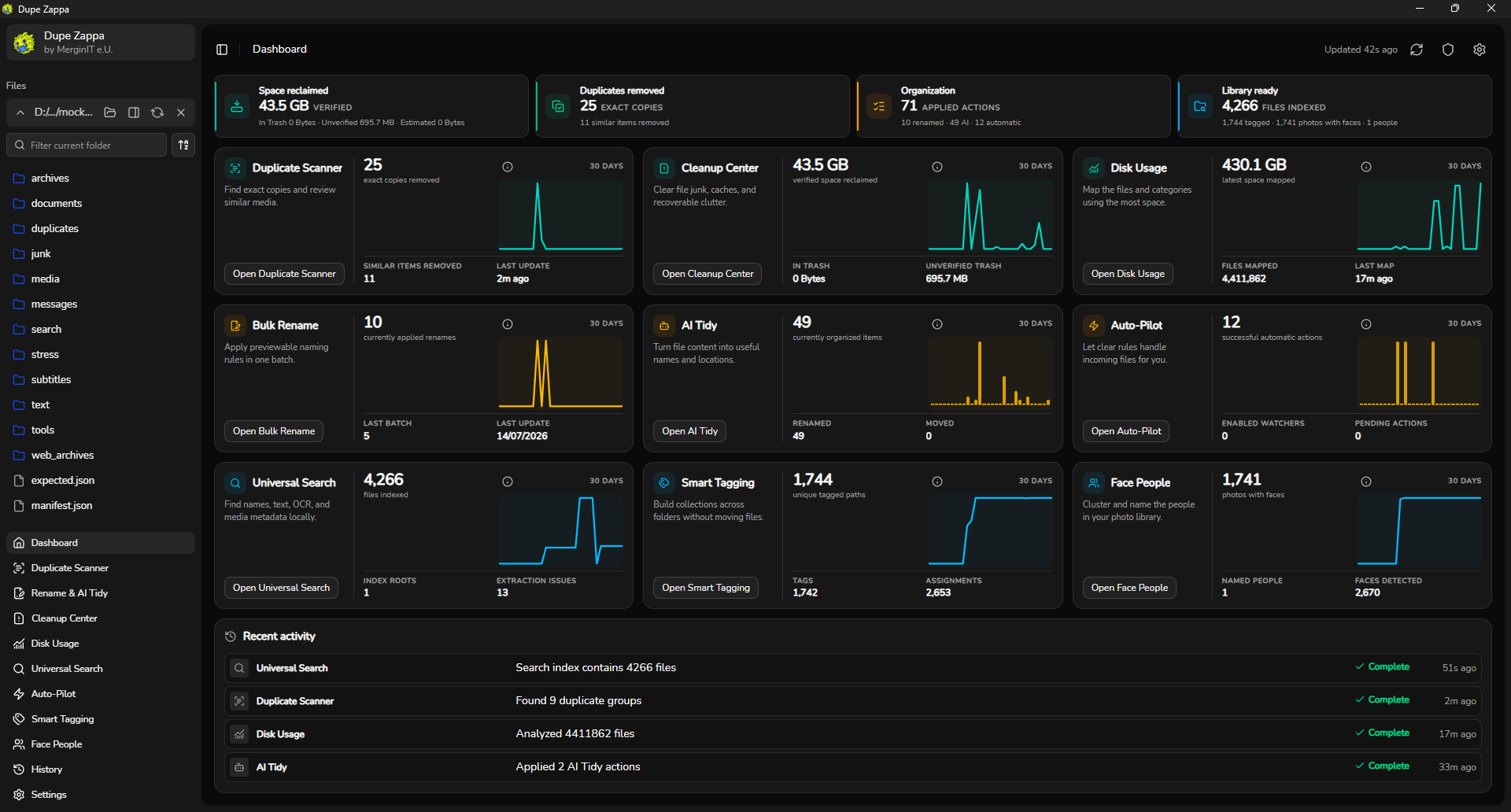
Ten tools in one install
dupeGuru finds duplicates. Dupe Zappa adds batch rename, content search, AI tidy, disk maps, auto-pilot rules, smart tags, and local face clustering.
One app, 10+ tools
Content search
Filenames plus what's inside
Everything finds filenames on NTFS in milliseconds. Dupe Zappa indexes PDFs, emails, archives, and optional OCR, then ties hits to preview-first cleanup.
Content search + cleanup in one suite
Direct licence
Keep the licence you buy
Duplicate Cleaner is a commercial Windows duplicate specialist with paid tiers after trial (see digitalvolcano.co.uk). A direct Dupe Zappa purchase is a perpetual one-device licence with all released future updates included.
One licence, no recurring fee
Free Tools
Free browser-side tools that surface folder pain fast.
Each tool stays local and non-destructive. The point is to let people see the problem, preview the solution, and then step into Dupe Zappa for the risky cleanup pass.
Storage triage
Storage Autopsy: Windows Folder Health Check
Run a local, read-only browser check for duplicate files, junk candidates, folder hotspots, and file types. Nothing is uploaded or changed.
Open toolDuplicate cleanup
Duplicate Folder Scanner Lite
Exact-match groups, image-similarity hints, and recoverable-byte totals. Local browser scan with no upload.
Open toolDecision support
Smart Duplicate Keeper Assistant
Apply keep-newest, keep-oldest, keep-largest, keep-highest-resolution, or keep-shortest-path logic to duplicate groups before you commit.
Open toolPreview-first organization
Batch Rename Previewer
Preview prefix, suffix, replace, numbering, and slug transforms without modifying files. Export CSV or PowerShell when you are satisfied with the pattern.
Open toolFast folder triage
Empty / 0-Byte / Junk File Finder
Classify common cleanup clutter locally in the browser so you can see what is safe to remove.
Open toolDisk triage
Folder Size Scanner Lite
Pick a local folder and see which immediate child directories consume the most space. Browser walk, not NTFS MFT, but fast enough for hotspot triage.
Open toolPhoto privacy utility
Photo Metadata Privacy Checker
Scan local photos for common EXIF privacy leaks and download stripped copies client-side when the browser can safely re-export them.
Open toolSafety + Performance
Fast scans, visible previews, reversible deletes.
Controlled cleanup with enough visibility to catch mistakes before they stick.
Preview-first by default
Move, delete, rename, and AI tidy workflows all lead with a before-and-after review step.
Recycle Bin by default
Deleted files go to the Windows Recycle Bin by default, so you can restore items if you make a mistake.
Readable progress details
Long scans display scan rates, estimated time remaining, exclusions, cache status, and current mode.
Built for large storage
Dupe Zappa is built for large local folders, network drives, and archive sprawl that slows down standard tools.
System Requirements
Built for real Windows machines.
OSWindows 10 or Windows 11 (x64)
RAM2 GB minimum / 8 GB recommended for large libraries
StorageSSD recommended
GraphicsWebView2-compatible display adapter
Optional7-Zip, LibreOffice, ffmpeg, fpcalc, Ollama, Windows OCR
Optional tools expand advanced workflows when installed.
FAQ
Common questions.
No. Dupe Zappa runs locally on your Windows machine. Scans, indexes, and optional AI Tidy requests stay on your network unless you explicitly configure a custom external API.
No. AI Tidy is optional. All duplicate scanning, junk finding, disk visualization, search, and tagging work without any AI provider.
Basic delete flows target the Windows Recycle Bin, so accidental cleanup is not immediately permanent. You can also undo or redo from the operation history.
Yes. Dupe Zappa is built for big local folders and shared drives. Scan exclusions and progress feedback help when network storage gets heavy.
Windows 10 or 11 x64 with WebView2. 2 GB RAM minimum, 8 GB recommended for large libraries. SSD storage is recommended.
Yes. The desktop evaluation lets you scan, search, analyse and preview throughout the app, and clean up 25 distinct duplicate groups. Paid content changes and automation require a licence.
You receive a perpetual licence for one active device, the website installer, and every future Dupe Zappa update that is released. There is no recurring subscription.
Yes. Sign in at the licence dashboard with your key, request the six-digit code sent to your purchase email, and deactivate the old PC before activating the new one. The old PC can remain licensed offline until its current seven-day entitlement expires.
No. Direct purchases use a MerginIT licence key delivered through Lemon Squeezy. Microsoft Store purchases are licensed and managed by Microsoft Store and do not include a separate MerginIT key.
Currently Windows only. macOS and Linux might come in the future, but they are not guaranteed.
Download
Install from the Microsoft Store and run your first scan.
Pick a folder, preview duplicate groups, and apply only what you have checked.